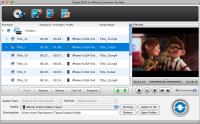
Tipard Mac DVD to iPhone Converter can easily rip and convert DVD to iPhone MPEG-4, H.264/MPEG-4 AVC, MOV, M4V video formats for iPhone, iPhone (3G), iPhone 3GS, iPhone 4. Further more, it can convert DVD to iPhone audio MP3, M4A, AAC, WAV.
Tipard Mac DVD to iPhone Converter can easily rip and convert DVD to iPhone MPEG-4, H.264/MPEG-4 AVC, MOV, M4V video formats for iPhone, iPhone (3G), iPhone 3GS, iPhone 4. Further more, it can convert DVD to iPhone audio MP3, M4A, AAC, WAV. Plus, it has been updated to have brand-new interface and latest system kernel, superior encoding and decoding performance, and support 5.1 track and No Audio output, have optional Aspect Ratio Settings & Zoom modes, adjustable output file volume, and support cue file and iPad 2 profile. And Auto-update function makes sure you always have the latest version now. Moreovre, it can support iphone 4S now.
Key functions:
1.Mac DVD to iPhone Converter
This iPhone Converter software can rip and convert DVD to MPEG-4, H.264/MPEG-4 AVC, MOV, M4V video formats for iPhone, iPhone 3G, iPhone 3GS and iPhone 4.
2.Convert DVD to iPhone audio
Convert DVD to iPhone audio MP3, M4A, AAC, WAV with super conversion speed and excellent quality.
3.Trim and merge
Tipard DVD to iPhone Converter for Mac can help you trim video file and join several pieces together as a single one.
4.Merge several chapters of DVD into one file
With several files merged into one file for output, you'll enjoy a single long movie with a single click.
5.Set output video and audio parameters
Set the Video Encoder, Resolution, Frame Rate, Video Bitrate. Set the Audio Encoder, Sample Rate, Channels, Audio Bitrate. You also can save all the output settings as your preference.
6.Support rich output formats for input files at a time
Input one or more files and set several different output file formats for each to save conversion time.
7.Set the video effects
Tipard Mac DVD to iPhone Converter provides the video effect parameters, video Brightness, Contrast, Saturation and audio volume.
8.Fastest Conversion Speed
Provide the fastest conversion speed (>400%), completely support dual core CPU.
Whats new in version 3.6.12:
Updated to support iphone 4S now.
Requirements:
512MB RAM, Super VGA (800×600) resolution, 16-bit graphics card or higher
Operating system:
Mac OS X,Mac Other,Other
Release notes:
Major Update

Ripping Blu-ray discs and DVD movies to iPhone-supported video formats;Converting Blu-ray discs and DVD movies to audio formats like M4A, WAV and MP3;Ripping Blu-ray discs and DVD movies to iPod videos;Converting Blu-ray discs and DVD mo
Price: $35.95, Rating: 7, Downloads: 159
Download

XFreesoft DVD Creator for Mac is a super easy DVD creator for Mac users to burn video to DVD. All DVD editing and conversion processes can be done with the most excellent quality and the fastest speed by using XFreesoft DVD Creator for Mac.
Price: $19.95, Rating: 6, Downloads: 110
Download

Power DVD Rip Studio is a powerful DVD copying and ripping software which can rips DVD to AVI, DVD to MPEG, DVD to WMV, DVD to WAV, and DVD to SVCD formats...
Price: $29.95, Rating: 9, Downloads: 102
Download

WinX Bluray DVD iPhone Ripper helps you rip/convert Blu-ray DVD to iPhone iPod MP4 H.264 video for smooth playback on your iPhone as well as iPad, iPod, iPod touch and Apple TV.
Price: $19.95, Rating: 6, Downloads: 100
Download 
 Tipard DVD to iPhone Converter for Mac 3.6.12 details